Platform 1: Google Classroom
Overview:
Google Classroom is a widely used learning management system that supports digital workflow in K–12 schools. It enables teachers to distribute assignments, share materials, collect student work, provide feedback, and streamline classroom communication.
User Engagement:
Students access assignments, view feedback, participate in discussions, and collaborate through shared Google tools (Docs, Slides, Sheets). Teachers organize lessons, post notes/assignments, and monitor student progress, while parents receive guardian summaries on missing or upcoming work.
Influence on Communication:
Communication becomes more concise and asynchronous. Announcements and private comments replace frequent verbal reminders. Students who may be shy benefit from online discussion posts however, the tone can be misinterpreted without explicit digital-communication norms.
Information Consumption:
Students engage with multilayered resources: embedded videos, links, and PDFs and shifting learning beyond a single textbook. Search-ability and quick access support independence, but may also lead to superficial engagement if students skim instead of deeply reading.
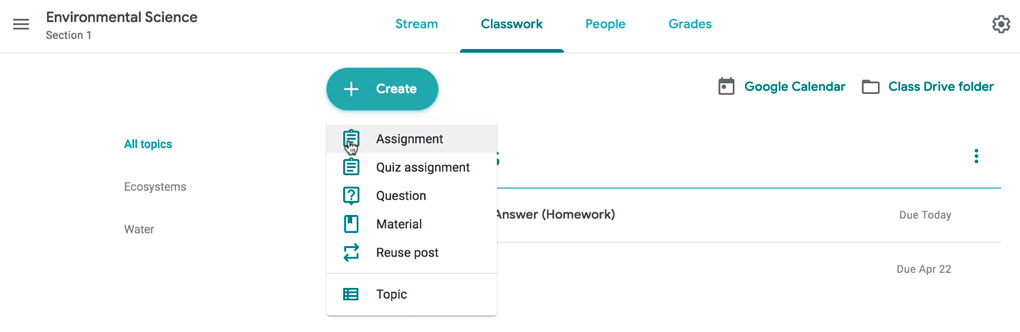 |
| Google Classroom: Different items teachers can post to relay to students. At the top you can see there is an area for "Grades" and on the left hand side it shows everything can be organized via topic, digital binder. |
Impact on Learning:
Positive:
Streamlines feedback and differentiation
Reduces lost papers and improves organization
Supports collaboration and accessibility tools
Challenges:
Students may rely too heavily on notifications rather than intrinsic organization
Tech issues can widen inequities if device access is uneven
Streamlines feedback and differentiation
Reduces lost papers and improves organization
Supports collaboration and accessibility tools
Students may rely too heavily on notifications rather than intrinsic organization
Tech issues can widen inequities if device access is uneven
Privacy & Safety:
Google Classroom complies with FERPA and COPPA guidelines, but risks still exist:
Students can inadvertently share sensitive information
School-managed accounts must enforce strong privacy settings
Careful management by schools is essential.
Students can inadvertently share sensitive information
School-managed accounts must enforce strong privacy settings
Careful management by schools is essential.
Required Literacies:
Digital organization — managing files, due dates, notifications
Communication etiquette — appropriate tone in comments/posts
Critical information processing — navigating multiple digital sources purposely
Teachers need platform-management skills; parents need basic digital monitoring and awareness of classroom expectations.
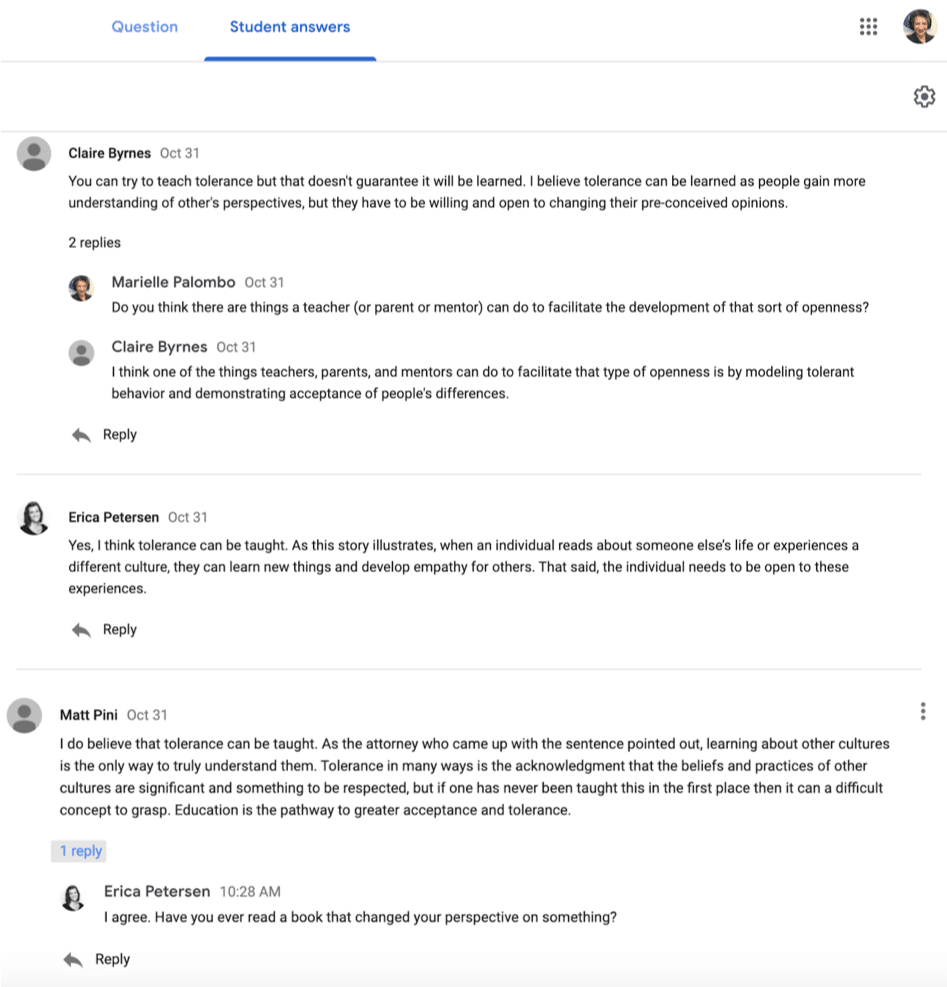
Facilitating Online Discussions in Google Classroom
Reflection:
Google Classroom has a strong impact on K–12 education by organizing learning in a central, accessible space that supports goals like collaboration, digital literacy, and student independence. It helps streamline assignments, feedback, and communication, making it easier for students to stay organized and for teachers to differentiate instruction.
Educators can use Google Classroom effectively by posting clear instructions, using multimedia resources, and giving timely feedback through comments and rubrics. When used intentionally, it enhances formative assessment, supports student engagement, and provides flexible ways for students to participate. Teachers have to be able to adapt quickly “when they face obstacles, they don’t wait for innovations-from-above to drop from the sky; they devise creative workarounds themselves”(Nichols, 2021). When challenges arise teachers work to come up with a solution on the spot. They don’t wait for someone to come with answers. Teachers and students work together to be resilient. Using Google Classroom provides ways for organization for students and clear communication with students, parents, and teachers. Parents play an important role by reviewing guardian summaries, encouraging responsible technology use, and helping their child manage deadlines. Their involvement strengthens the home–school connection and helps students stay on track.
Digital organization — managing files, due dates, notifications
Communication etiquette — appropriate tone in comments/posts
Critical information processing — navigating multiple digital sources purposely
Platform 2: iReady
Overview:
iReady is an adaptive online instructional program used in K–12 settings to assess students’ reading and math levels and provide individualized learning paths. It includes diagnostic assessments, interactive lessons, progress monitoring tools, and teacher dashboards that help guide instructional decisions.
User Engagement:
Students complete adaptive lessons, quizzes, and learning games that respond to their performance in real time. The platform gives immediate feedback, visual progress tracking, and personalized lesson playlists. Teachers use iReady to review diagnostic data, analyze growth trends, assign targeted lessons, and monitor student performance. Parents access reports (when schools provide them) showing their child’s strengths, areas of need, and time-on-task.
Influence on Communication:
Communication becomes more data-driven. Teacher–student conversations often reference lesson scores, growth goals, and need for reteaching. Students receive quick automated feedback from the platform, which can reduce the amount of direct verbal feedback they expect from teachers. Parents may rely heavily on digestible data summaries instead of full explanations of student learning needs, which can oversimplify the complex learning gaps.
Information Consumption:
Students interact with multimodal content such as animations, audio support, step-by-step walkthroughs, and practice grade level or scaffold lessons that meet their needs. Their “pathway” provides lessons that are adaptive, students consume information at a personalized pace. However, the “gamified” structure may lead students to click quickly through items without deep comprehension if not monitored or supported appropriately.
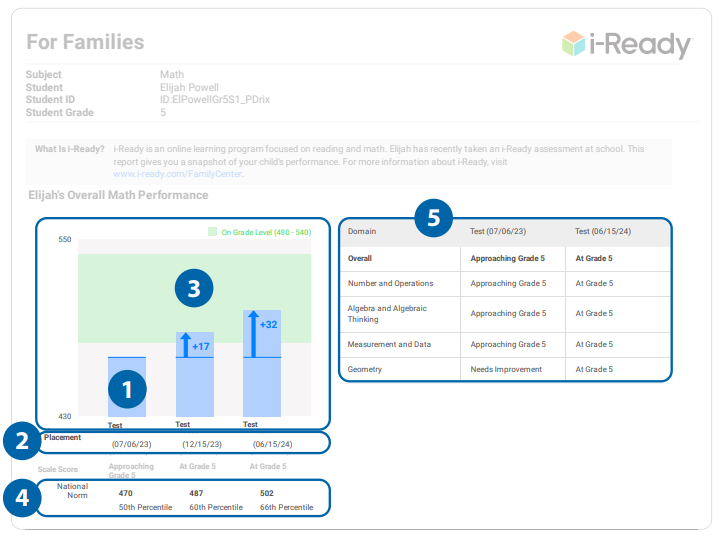 |
| iReady Family Report: This has the students scores from the diagnostic with the growth they made every time. It shows where the student is in relation to "on grade level". |
Impact on Learning:
Positive
- Provides individualized instruction aligned to each student’s level
- Offers consistent progress monitoring and growth data
- Supports foundational skill-building through, scaffolded lessons
- Gives teachers insight into specific misconceptions and learning gaps students have
- Provides a student/family report that is simple to understandChallenges:
Students may become overly dependent on the hints or the platform’s guidance
Low persistence or frustration tolerance can hinder progress in adaptive lessons
Too much time on screen can limit opportunities for hands-on math or reading instruction
Some students “game the system” by guessing quickly to shorten lessons or toggle the screen to make it seem like they are working
Students may become overly dependent on the hints or the platform’s guidance
Low persistence or frustration tolerance can hinder progress in adaptive lessons
Too much time on screen can limit opportunities for hands-on math or reading instruction
Some students “game the system” by guessing quickly to shorten lessons or toggle the screen to make it seem like they are working
 |
| iReady Dashboard: My Path Lessons with the students stats on the right hand side |
Privacy & Safety:
iReady follows FERPA and COPPA guidelines. Still, because it collects detailed learning data, there are considerations:
Sensitive academic data must be handled carefully by districts
Students sometimes use shared devices–desktops, increasing the risk of unauthorized access
Sensitive academic data must be handled carefully by districts
Students sometimes use shared devices–desktops, increasing the risk of unauthorized access
Required Literacies:
Data literacy: Students and parents must interpret performance levels, lesson scores, and growth measures
Self-regulation: Managing frustration, pacing, and persistence in adaptive lessons
Digital navigation: Understanding how to access lessons, view feedback, and track progress
Instructional data analysis (teachers): Interpreting the diagnostics, setting goals for themselves and the students, and planning targeted instruction
Awareness of expectations (parents): Monitoring their child's time-on-task, encouraging appropriate use by their child, and understanding family reports
Reflection:
iReady significantly shapes K–12 education by providing personalized, data-driven instruction that aligns with goals such as differentiation, progress monitoring, and targeted skill development. Its adaptive lessons help students work at their own level while giving teachers clear insight into strengths and areas of need.
Educators can use iReady effectively by analyzing diagnostic data, assigning targeted lessons, and using the platform’s reports to guide small-group instruction. It’s important when “integrating social media in the curriculum needs to be intentional … teachers often lack training in utilizing digital resources … It is important that teachers are trained in digital tools” (Ledgerwood, 2022). When paired with classroom teaching and not used in isolation, iReady can deepen understanding and support meaningful growth. I have gone through at least 3 training sessions on iReady since last October. I feel well informed on how to implement it and best practice with it. When it comes to families, I was asked by my building principal to give an information session about iReady, reading the family report, and taking questions to help families have a good understanding of it. Parents support engagement by monitoring time-on-task, encouraging persistence during challenging lessons, and reviewing progress reports. Their involvement helps students stay motivated and ensures iReady use is consistent and purposeful.
Resources
Data literacy: Students and parents must interpret performance levels, lesson scores, and growth measures
Self-regulation: Managing frustration, pacing, and persistence in adaptive lessons
Digital navigation: Understanding how to access lessons, view feedback, and track progress
Instructional data analysis (teachers): Interpreting the diagnostics, setting goals for themselves and the students, and planning targeted instruction
Awareness of expectations (parents): Monitoring their child's time-on-task, encouraging appropriate use by their child, and understanding family reports
Resources
